Before I explain any architecture, here is the moment this product was really designed. A shopkeeper I worked with showed me his weekday: a desktop POS program that had crashed twice during the previous week's festival rush, a green-bar accounting register he updated twice a day from printed receipts, and a WhatsApp group where he sent inventory count photos to his supplier. His problem was never "I need software." It was "I need Friday closing to take twenty minutes instead of three hours."
That reframing — the product is the end-of-day workflow, not the touchscreen — shaped every technical decision in Tillqorin POS, the retail commerce platform I built and now maintain. This case study walks through the architecture honestly, including the decisions I would still make and the two I would change — because case studies that only celebrate teach nobody anything.
The actual problem retail software must solve
Sell-through features — barcode scanning, cart UX, discounts — are the visible part of a POS. Underneath, shops live and die by three invisible invariants:
- Stock that reconciles. Every sale decrements inventory exactly once. Not almost exactly once. If the physical shelf and the system disagree by evening, the owner stops trusting the system, and a distrusted system gets abandoned within a quarter — I have watched it happen to a competitor's product at a client's shop.
- Invoices that print on cheap hardware. Thermal receipt printers are the ugly, delightful, stubborn plumbing of retail. They do not care about your framework; they care about line widths and cut commands.
- Numbers the owner understands without a consultant. Revenue, expenses, net profit, today, this week. If answering those requires exporting CSVs and a spreadsheet ritual, the software failed no matter how elegant the codebase is.
Consumer-mobile thinking arrives at retail with the wrong priorities, which is why the market is full of beautiful POS apps that shopkeepers quietly stop opening. Build for the register, not the demo.
Architecture overview
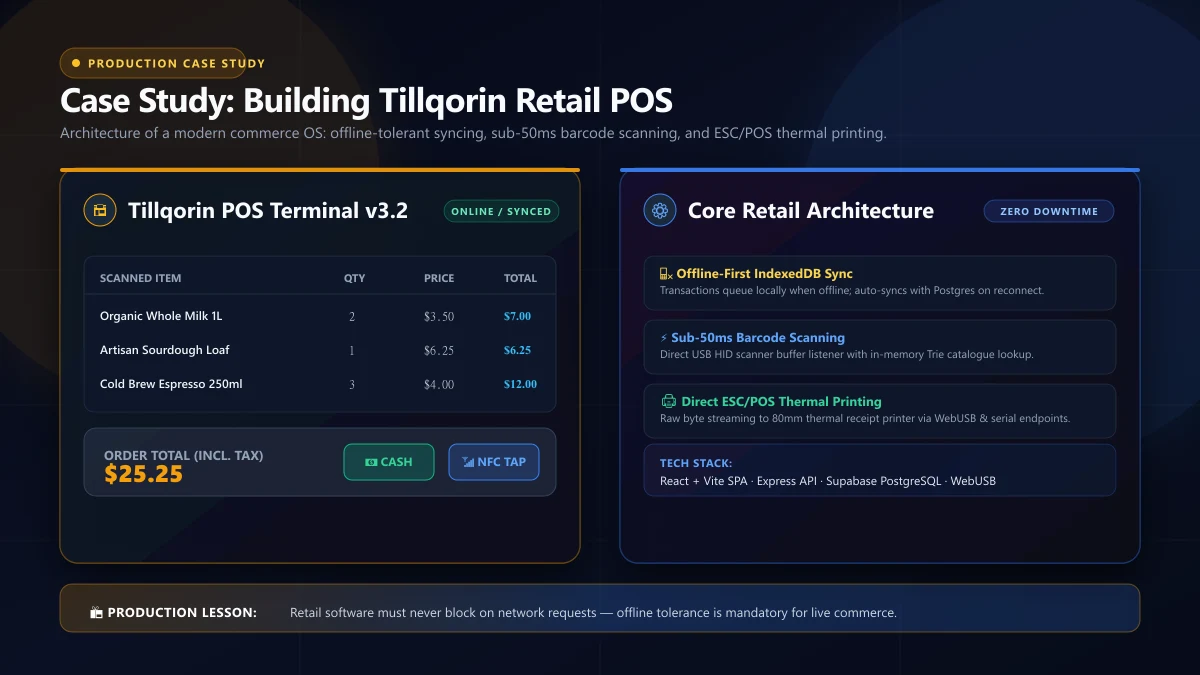
The stack ended up deliberately conventional, because retail rewards boring strong bones:
- Frontend: React + Vite + TypeScript, with a UI tuned for number-pad-first operation — keyboards and scanners over taps, because a cashier ringing fifty items never wants to reach for a mouse.
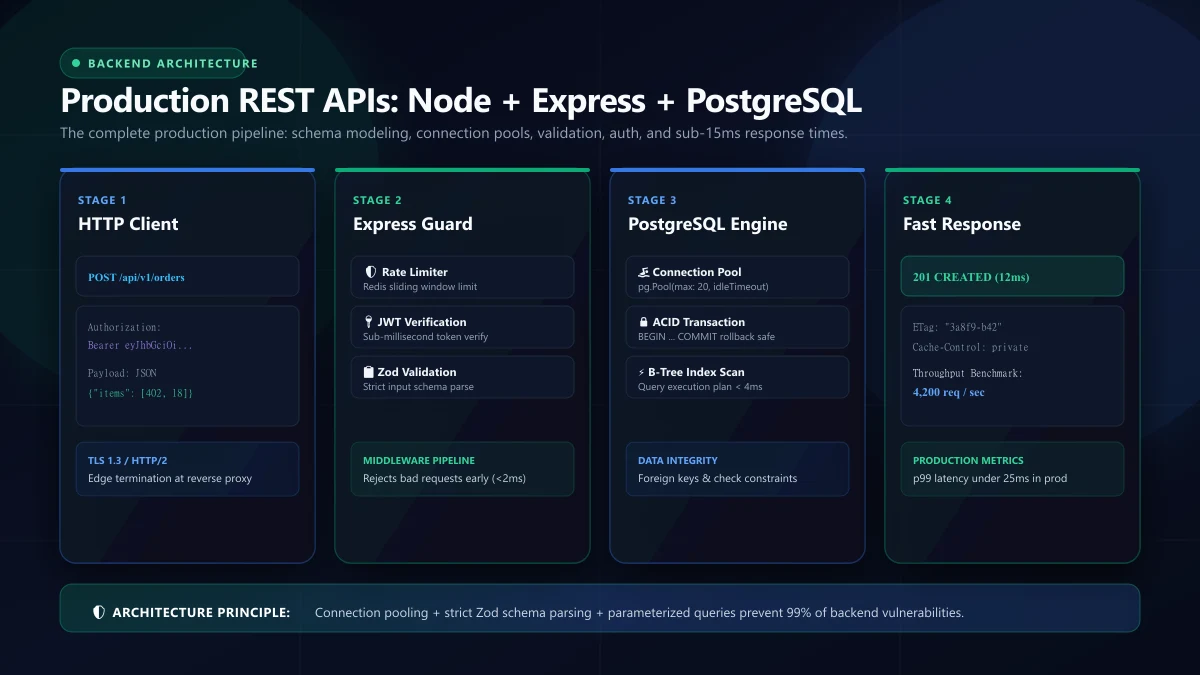
- API: Express.js REST services, strict validation at the boundary, transactions wrapped around every sale.
- Database: PostgreSQL (Supabase) with double-entry style bookkeeping tables; reports derive from actual movements rather than cached counters.
- Printing: receipts rendered declaratively and driven to ESC/POS thermal printers through a small local print bridge.
Decision 1: one transaction per sale, enforced by the database
The money decision, in every sense. A sale touches the order header, order items, inventory movements, and expense/ledger rows. Those four writes are wrapped in a single database transaction so they are all-or-nothing — a crash between them leaves the books untouched, never half-written.
BEGIN;
INSERT INTO orders (...) VALUES (...);
UPDATE inventory SET qty = qty - 4
  WHERE sku = $$xyz$$ AND qty >= 4;   -- constraint refuses negative stock
INSERT INTO ledger_entries (...) VALUES (...);
COMMIT;
Notice the constraint does the safety work: qty >= 4 combined with a CHECK (qty >= 0) means overselling is structurally impossible, not merely discouraged. I first wrote this feature in application code — check stock, then decrement — and race conditions taught me within weeks that the database is the correct place for this invariant. That failure taught me more about concurrency than any course: two registers selling the last unit at the same instant is not an edge case; it is Tuesday.
The accounting angle came from a realization mid-build: revenue reports computed by SELECT SUM(...) over orders drift from reality the first time someone deletes or edits an order. So the ledger is append-only — sales, purchases, expenses, refunds all append entries, and reports derive from movements. A wrong entry gets a correcting entry, like actual bookkeeping. Sounds heavier; in practice it is the same four tables and it made the P&L screen trivial.
Decision 2: treat printing as a first-class feature
Thermal printing is where web-first developers quietly fail retail. Paper is a physical medium with physical rules: 58mm and 80mm rolls, charsets, cut commands, and drivers that range from saintly to ornery. The approach that held up:
- Receipt templates defined declaratively — line items, columns, widths — so a template renders correctly across both roll sizes, and the cashier's copy flags (dupe copies, VAT breakdowns) become data, not bespoke code paths.
- A tiny local print bridge talks ESC/POS directly, because browser rendering cannot be trusted to look identical on every driver; the browser hands a structured receipt to the bridge and the bridge owns the dialect.
- A test receipt every morning. Sounds small; prevented more morning-fury incidents than any other single feature. Retailers forgive a slow report; they do not forgive a register that stops printing mid-rush.
The wider lesson transfers to any product bridging digital and physical: model the physical side's constraints explicitly, and test the physical path as a feature, not as an integration afterthought.
Decision 3: analytics as derived data, not loops
The dashboard answers four questions: revenue, expenses, net profit, stock risk. Every number on it is computed in SQL from movements, with materialized aggregates refreshed on a timer, and indexes placed on the columns the day-close queries filter and sort by:
SELECT date_trunc('day', occurred_at) AS d,
       SUM(CASE WHEN kind = 'sale' THEN amount ELSE 0 END) AS revenue,
       SUM(CASE WHEN kind = 'expense' THEN amount ELSE 0 END) AS expenses
FROM ledger_entries
WHERE occurred_at >= $$2026-10-01$$
GROUP BY 1 ORDER BY 1;
.compute-in-SQL shows up on the end-of-quarter report too: when history hit hundreds of thousands of rows, nothing changed about page code — the indexes did the work. A JavaScript aggregation version I built first as a stopgap was already timing out by month three. Everywhere else in this product I chose pragmatism; here the relational investment is what owners actually buy.
Decision 4: every report exports to Excel
When I demoed early versions, one objection repeated until it became a feature requirement: "can I get this out as Excel?" The answer is now across every key report — sales by register, stock movement, expense lists, the daily close. It cost maybe two days total and removed the biggest psychological blocker between spreadsheet-brain owners and the new system. Do not fight the spreadsheet; on-ramp from it.
What I would still choose, and what I would change
The transaction-per-sale design, the ledger, SQL-side analytics, Excel export: all of these I would choose identically tomorrow. Two things I would do differently, honestly:
- I under-invested in multi-register setup flows. The first shop ran one register, and the second client had three, and register-scoped session handling arrived as a retrofit. Cheap upfront design — a
register_idon sessions and movements from day one — would have saved that afternoon of surgery. The general lesson: the second customer's shape is knowable in advance if you ask the right question early. - I underestimated label printing's ecosystem. Barcode label generation works — but label printers, unlike receipt printers, span a wilder range of dialects and sheet formats. A narrower first version would have shipped sooner; instead I spent two extra weeks making Zebra-style label dialects behave. Fine outcome, later feature.
What it looks like in production
The deployed app runs live at pos.taylancetech.com on the Supabase-backed API, serving real registers with real paper coming out of them every day. The build runs Lighthouse-90-plus, renders AVIF-served imagery, and survives the actual test retail presents: an internet blip at 4 p.m. followed by an owner who still needs to close their day.
Cost structure, honestly itemized
Since case studies tend to hide the spreadsheet, here is where Tillqorin's ongoing costs actually accrue — useful to any team budgeting a similar build:
- Compute: the API instance is modest; the register traffic is bursty-but-light. Database capacity (Supabase tiering) is the largest monthly line, sized on ledger growth and backup retention rather than on CPU illusions.
- Backups and retention: daily backups plus point-in-time recovery. This is a production bookkeeping system — recovery objectives matter more than uptime numbers, and the tier reflects that priority.
- Maintenance effort: the honest line item. Dependency updates, driver tweaks when a client swaps printers, and the occasional report the owner dreams up on a Tuesday. It is a few hours monthly, not a team — and that's the number to compare against any hosted-POS subscription when a shop weighs build-versus-buy.
- What does NOT appear: per-transaction fees, per-user licensing, or paywalls on reports. The shop's software cost stops being a mystery bill that scales with their revenue — a structural reason small merchants care about owning their stack, and quietly one of the most persuasive arguments in every implementation conversation I have had.
What this project teaches about commerce builds generally
Strip the retail specifics and four transfers to any commerce or inventory platform:
- Make the database the source of truth; the UI is a view over it. Every invariant you can push into constraints is a bug class deleted.
- Transactions are your accounting department. If amounts move, wrap the move.
- Figure out the boring physical media early. Printers, scanners, offline days — design these as features with owners, not as integrations with warnings.
- Ask about the second customer while building for the first. Multi-register, multi-location, multi-currency questions are cheap when asked in week one and brutal when asked in month nine.
The daily close: designing for the realest fifteen minutes in retail
Every retail product has a signature workflow, and Tillqorin's is the day-close: count the drawer, reconcile hardware cash against system totals, book expenses that never had receipts, print the summary, lock the day. I mention it because it reshaped three subsystems that the feature-list view of the product never touches:
- Immutability windows. Once a day closes, its ledger entries become locked — corrections arrive as dated adjusting entries rather than edits. The owner's books stay auditable, and "what changed yesterday" is a query, not a forensic project.
- Snapshot-based reporting. Stock and cash reports snapshot at close time. Asking "what was in stock on the 14th?" is a direct lookup instead of replaying movements — a design decision that later rescued two disputed-shrinkage conversations from becoming arguments.
- Tolerance for messy input. Real expenses arrive as a photo at 11 p.m. with a scribbled total. The quick-expense flow accepts an amount and a category and asks nothing else; the perfection layer is optional because reality is imperfect and friction at midnight is how data entry dies.
The transferable principle: find the workflow your users do when they are tired, and optimize for it specifically. Software designed around fresh-morning users quietly fails the 10-hour shift, which is the only shift that matters in operations-heavy products.
Multi-register and the permission model that grew up
The first deploy assumed one register per shop, and reality corrected me within weeks: the second client had three counters and a back office. The retrofit taught me the design that should have existed from day one, and it is worth documenting because any multi-terminal product will need it:
- Every session belongs to a register; every stock movement and every ledger entry carries the register id. Reports slice by counter without special-casing, and the "same total, different drawer" reconciliation problem dissolves structurally.
- Roles live at the action level, not the menu level. Owner, manager, cashier map to capability checks in the API — price edits, refunds, report access, user management — so the UI reflects permissions instead of hiding them. Menu-hiding as a security model is how cashiers learn what the system would prefer they did not know.
- Shift handovers are explicit transactions. Cash counted in, cash counted out, difference recorded. The informal spreadsheet ritual that shops otherwise run — and argue about — became a first-class screen, which generated more goodwill than any chart I built that quarter.
Security-wise, the pattern that matters most in retail-grade systems: the server owns every meaningful decision. The register displays prices; it does not decide them. Discounts, refunds, and stock adjustments all pass the API's permission checks regardless of what the client UI permits. Trust the client to render; never to authorize.
Performance under register load — measured, not assumed
Retail performance has a specific shape: bursty, short, unforgiving. A sale flow must complete in well under a second from scan to printed receipt, because the queue of customers is the real user of your response time. The engineering behind the numbers:
- Hot-path indexes verified under production-shaped data: SKU lookups, register-scoped session queries, day-range ledger filters. The
EXPLAIN ANALYZEruns were done with synthetic volumes at 100× demo scale, because query plans lie at small row counts. - Connection pooling from day one. Registries of concurrent sessions across multiple counters share a pool; without it, register three's handshake storm starves register one's sale transaction. The fix predates the problem.
- Receipt rendering off the critical sale path. The database transaction commits; the print job is queued locally and retried — a printer jam must never roll back a sale, a decision I reached after watching a client's old register lose a sale to a paper-out.
FAQ
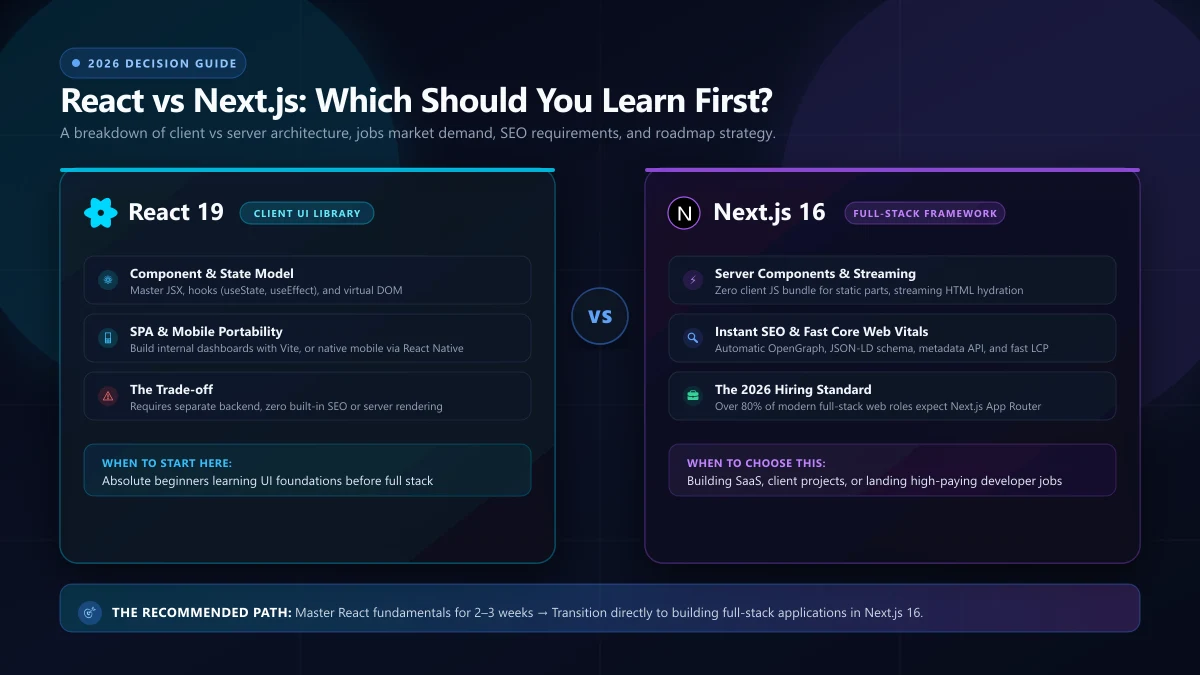
Why React + Vite instead of Next.js for this? A POS is an authenticated tool with zero SEO surface; the SPA shape is genuinely the right tool here, which is exactly the framework-boundary question from my React-vs-Next piece. Next.js earns its keep on public pages; this product has none.
Why not a native desktop app like legacy POS? Because the owner needs to see the shop's numbers from anywhere, a desktop installer needs local maintenance for every machine, and updates deploy instantly on the web. Modern web handles the register just fine, and the bridge handled printing.
How is offline handled? The honest answer: tolerant, not independent — queue sales locally and sync when connectivity returns, with reconciliation on reconnect. Full offline-first retail is a different project; regional connectivity patterns shaped the compromise.
Looking back over a year of maintenance, the features that stuck were the boring ones: end-of-day reports, offline receipts, printer retry logic. The features that got ripped out were the clever ones. If you are scoping a POS, budget your timeline accordingly: seventy percent boring plumbing, twenty percent polish, ten percent clever, and even that last ten percent goes under review every quarter.
Where is the product page? The live register app runs at pos.taylancetech.com; the case study page has the deep detail, and my contact page is where POS and commerce projects start.
One reviewer-style closing thought for anybody building retail adjacent software after reading this: walk a shop's Saturday with the owner before writing a line. Sales, refusals, drawer counts, the printer's worst moment, the report the owner actually opens — the product definition writes itself in that afternoon, and no requirements document has ever captured half of it. The technology field is full of smart people building lovely software around imaginary retailers; the entire difference in Tillqorin's adoption story came from building around real ones.