The first accessibility audit I ever ran on my own code humbled me in a way I still remember. My portfolio was — I believed — in good shape: semantic layout, decent contrast, keyboard navigation that mostly worked. The scanner disagreed. Eleven unlabeled form fields, two links that said "click here," a modal that trapd focus into a corner, and a color pairing I had chosen because it looked sophisticated in my editor, not because anyone could read it on a phone in sunlight. Every single one of those was a two-minute fix. Every single one had been live for months.
That is the experience I want to transfer with this article, because accessibility has a strange reputation problem: teams imagine it as a large, expensive, specialist discipline involving lawyers and screen readers and month-long remediation projects. In reality, the majority of what audits find — and the majority of what actually blocks users — is exactly the same category of cheap, automatable defect I found on my own site. And in 2026, with the European Accessibility Act in force for products sold into the EU, and ADA lawsuits against websites still routine in the US, "we will get to accessibility later" is no longer a cost-neutral position.
So this is the practical path: automate what can be automated, run it in CI so it never regresses, and reserve people for the things automation genuinely cannot see. Everything here is battle-tested on AuditBloc, the free accessibility and compliance scanner I built — so where I say "the scanner does this," I mean it literally.
Why automation catches more than teams expect
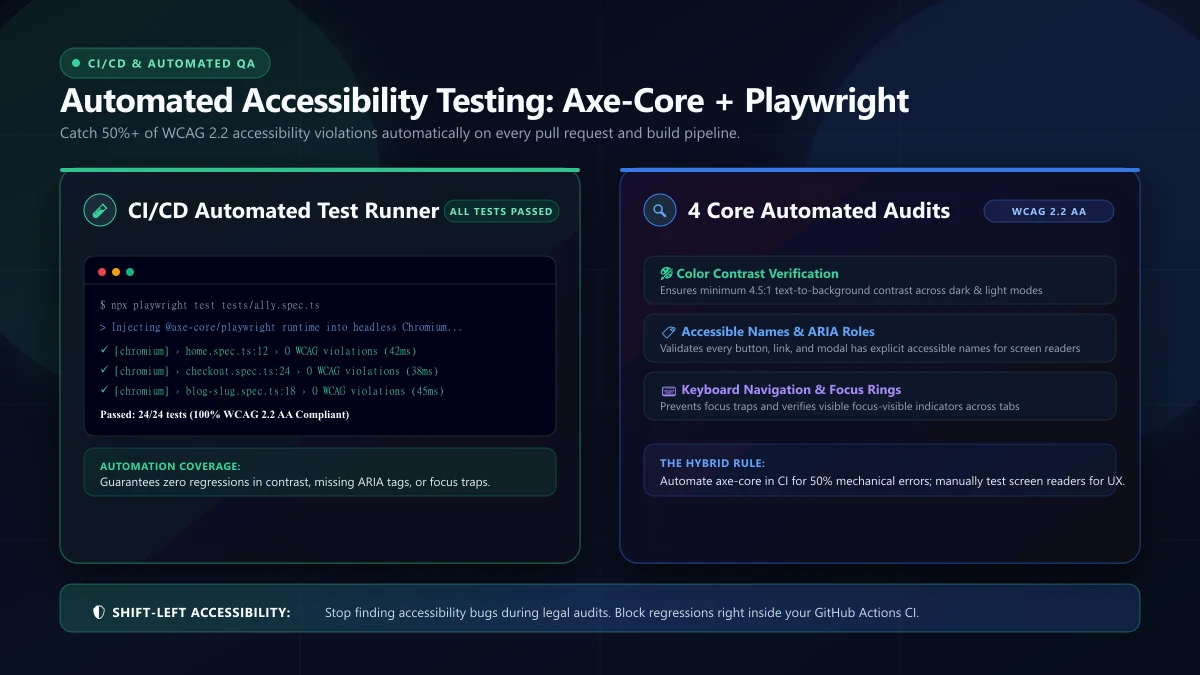
The stereotype says automated accessibility testing can only find "alt text problems," so it gets dismissed as superficial. That underestimates what modern rule engines actually evaluate. Against a rendered page, axe-core evaluates violations across rule sets, and in practice it catches:
- Missing or meaningless alternative text — decorative images marked as content, or content images with alt="image" (which is a violation dressed as compliance).
- Form fields without programmatic labels. Placeholder-as-label specifically: the gray text in the box is not a label; it disappears the second anyone types.
- Contrast failures. Ratios below 4.5:1 for text, 3:1 for large text and UI boundaries — the most common "design decision" that fails real users.
- Broken landmark structure and heading hierarchy. Pages with no h1, heading levels skipping, or regions assembled from divs where landmarks were intended.
- Misused ARIA. Adding roles that contradict the element underneath. Bad ARIA is measurably worse than no ARIA, because it is a lie the screen reader trusts.
- Duplicate IDs, empty interactive elements, no document language, missing page titles, and viewport configurations that block zoom.
Notice the shape of that list: these are structural facts about the DOM. That is exactly why automation is good at them — the machine can read the DOM perfectly, and most accessibility failure is invisible-to-eyes structural damage. What automation cannot read is intent, which is the boundary we will draw later in the manual-testing section.
The setup, step by step
Assuming you already have Playwright configured, wiring axe-core in takes minutes:
npm i -D @axe-core/playwrightimport AxeBuilder from '@axe-core/playwright';
import { test, expect } from '@playwright/test';
const WCAG_TAGS = ['wcag2a', 'wcag2aa', 'wcag21aa'];
test('homepage passes WCAG 2.1 AA checks', async ({ page }) => {
await page.goto('/');
const results = await new AxeBuilder({ page })
.withTags(WCAG_TAGS)
.analyze();
const blocking = results.violations.filter(
(v) => v.impact === 'critical' || v.impact === 'serious'
);
expect(blocking).toEqual([]);
});Three implementation details make the difference between a scanner that produces value immediately and one that produces noise and gets deleted:
Pin the standard deliberately. withTags selects the conformance target. WCAG 2.1 AA is my default for existing products in 2026; WCAG 2.2 AA for new builds, since 2.2 adds focus-appearance and interaction-target rules that map directly to mobile usability. Similarly, do not filter rules out because they are inconvenient — instead, if a specific rule cannot be met yet (a legacy chart library, say), write the exemption down in a visible file with the reason and the removal date. Exemptions that live in someone's memory are permanent incidents waiting to be rediscovered.
Scan interactive states, not just initial load. Most real violations hide behind interaction: the modal that steals focus, the invalid form state whose error messages are not associated with their inputs, the menu that renders in DOM but patches the aria-expanded flag wrong. My scanner loop drives each page through a standard interaction matrix — open dialog, submit-empty-form error, expand menu, trigger toast — and runs axe at each state. This is where scanner results typically double or triple, and where the cheap fixes hide.
Fail only on what is actionable. The expect-all-violations-empty version fails fast in real codebases (there is always old debt). Gate releases on serious and critical; track moderate and minor as backlog items with an age limit. A scanner whose red light never turns green teaches the team to ignore scanners.
Beyond axe: cookie banners and AI disclosure
Two compliance surfaces sit outside classic accessibility but live in the same scanner — and they are the reason teams come to tools like AuditBloc instead of a bare axe workflow.
GDPR cookie banner behavior
A compliant banner is not just present — it must respect three behavioral rules that are checkable programmatically:
- Equal reachability: reject/decline is as reachable as accept — same prominence, same interaction cost. The dark-pattern version (bright blue Accept, gray-outlined tiny Reject) fails this.
- No pre-consent tracking: non-essential scripts (analytics, ad pixels) must not fire before consent. Automatable by counting network requests to known tracker domains during the pre-decision window.
- Honest persistence: the choice persists; re-prompting every visit is friction no user deserves.
I encoded these as scans with domain heuristics and request interception, and the pre-consent tracker check alone routinely finds marketing tags firing from the banner script itself — an irony that never gets old.
AI content disclosure
Several regimes now expect obvious disclosure of machine-generated content, and it is a textually checkable surface: does the page disclose AI-generated copy where present, or does it present machine text as human? A scanner cannot resolve philosophical questions, but it can flag pages containing AI-generation markers with no disclosure language near them — which catches the real failure mode: automation of content with zero policy. On the AuditBloc side, this check started as the least requested feature and now gets the most usage, which tells you something about where 2026 is going.
What automation cannot catch — the manual list
Honesty section, because pretending otherwise produces false confidence. Four areas genuinely need a human, and I document them inside AuditBloc for exactly this reason:
- Keyboard focus order and logic. Automation sees focusability; only a human tabbing through feels whether the sequence follows meaning. The classic break is visual order versus DOM order after someone absolutely-positioned a hero element for a design comp.
- Screen reader announcements. A technically-present label can still announce nonsense. "Filter, button, edit, filter-3, filter, button" is a nightmare no rule engine can judge — it requires actually listening. If you have never spent twenty minutes with a screen reader (NVDA on Windows is free), it is the highest-ROI hour of disability simulation in the industry.
- Meaningfulness of feedback. "An error occurred (code X-4021)" is technically present, semantically useless. Whether error messages help users recover is judgment, not parsing.
- Cognitive load. Is the flow itself understandable? No lexical rule can simulate a first-time user under stress with one hand full.
The right mental model is a funnel: automation as the cheap, dense first pass; manual keyboard and screen-reader passes as the human layer above. Teams that skip the automation layer waste their scarce expert attention on missing alt text — the audit equivalent of paying an engineer to find typos.
CI integration: making red the normal state of bad
Accessibility dies through regression, not through initial omission. Nobody knows that better than teams with a certified-first-pass product that decayed within two release cycles. The fix is boring and effective: the scanner runs on every pull request, and the build goes red for serious/critical violations, identically to a failing test:
# .github/workflows/a11y.yml (excerpt)
jobs:
  accessibility:
    runs-on: ubuntu-latest
    steps:
      - uses: actions/checkout@v4
      - run: npm ci
      - run: npx playwright install --with-deps
      - run: npx playwright test tests/a11y --reporter=list
Two practices keep the pipeline humane. First, snapshot exemptions in a reviewed file rather than inline skips, with dates. Second, keep the suite fast — the axe pass on a static page is milliseconds; it is Playwright's browser startup that dominates, so batch all pages in one worker set. A scanner that adds three seconds to PRs survives; one that adds eight minutes gets disabled by someone in week three, and then everything silently regresses again.
The business case, minus the moralizing (but not without it)
Accessible-first improves your product for everyone: good labels make forms clearer for every user, focus management makes flows faster for power users, contrast survives real screens and sunlight, and semantic structure is literally the thing search engines parse — there is a reason accessibility fixes and SEO fixes rhyme so often. Legal exposure is real and rising: EAA enforcement for EU-facing products, a steady stream of ADA web suits in the US, and procurement contracts demanding conformance statements. The cheapest moment to fix a violation remains the PR in which it was written; the most expensive is the remediation project a customer's lawyer requests.
But the underlying reason is simpler than any of that: roughly one in six people interacts with reduced sight, dexterity, or attention at some point, temporarily or permanently. Every design decision you ship splits those users into included and excluded, and the vast majority of the time, exclusion was an accident — an unlabeled field nobody spelled out. Automation is how the accident becomes impossible before the PR merges.
FAQ
Does automated testing alone make a site "compliant"? No — automation covers a meaningful slice, manual passes cover the rest. Compliance claims come from the whole funnel plus documented process, which is what EU/US expectations look at.
Which standard: WCAG 2.1 AA or 2.2 AA? 2.1 AA is the conventional minimums bar for current audits; 2.2 AA for new builds. The deltas (focus appearance, target sizes, accessible authentication) map straight to mobile usability.
Single-page apps — do scanners still work? Yes, with a caveat. Scanners see one DOM at a time, so the interaction matrix matters even more; route changes, modals, and async states must be scanned explicitly or they are invisible.
Can I test MPA content behind a login? Yes with authenticated Playwright contexts, and it is the standard approach for dashboards — use storageState from a prepared login fixture.
Where do I start with zero budget? The axe pass in CI plus the manual keyboard-screen-reader pass per major flow. That configuration is free, and it catches roughly the same defect categories the expensive agencies do.
Choosing tools in 2026 — an honest field guide
The accessibility tooling shelf is crowded, and teams waste real weeks auditioning scanners. Here is the honest placement of the main options from having used most of them:
- axe-core (via Playwright/Webdriver or a CI step) — the densest rule engine with the best remediation guidance. This is the backbone for automated passes; start here, and if you only pick one thing, pick this.
- Lighthouse accessibility checks — a lighter axe-derived pass bundled into familiar audits. Fine as a smoke layer; insufficient as the primary gate, because it runs one state and its rule subset is narrower.
- Pa11y and friends — good for cron-style page sweeps across many URLs on schedule. Complements CI nicely for drift detection on marketing pages no one touches for months.
- Manual + assistive-tech audits — not a tool you install but a discipline: keyboard-only walkthrough per flow, NVDA or VoiceOver passes on the critical journeys, and screenshots of real screen-reader output for the team to react to. Nothing replaces this layer; see the funnel above.
The combination that I consider the 2026 sweet spot: axe in CI for enforcement, scheduled Pa11y-style sweeps for drift, and a quarterly manual pass on the flows real users actually traverse. That funnel catches the majority of defects at near-zero operational overhead once set up — which is precisely why it stays set up.
Communicating accessibility results beyond the engineering team
Technical findings die in engineering meetings unless translated for the people who fund the fixes. The reporting layer I bring to stakeholders:
- Risk framing first: what the violations mean for legal exposure and audience size, stated without drama. "12% of checkout visitors cannot complete the primary flow on a screen reader" moves budgets; "rule AX_23 failed" does not.
- Effort framing second: most findings cluster into hours-scale fixes. Labeling the backlog honestly — "80% of this is a two-sprint cleanup" — converts the imagined year-long project into scheduled work.
- Trend reporting: violations over time, open vs closed, and the age of the oldest open item. Trend lines make accessibility a managed program rather than a one-off audit, and the age metric is what keeps executive attention when deadlines compete.
One cultural note that has worked consistently: celebrate closes, not opens. A team that sees "violations down 40% this quarter" internalizes accessibility as progress, while a team only seeing red dashboards contracts off it. The dashboards are for engineers; the trend line is for everybody.
A few notes on the parts that took longer than expected, since those are usually the most useful parts of a case study. Keyboard trap detection in modals was one: the scanner can flag a dialog that never returns focus, but deciding whether focus was lost or merely parked on an inert wrapper took three attempts, and the middle attempt produced false positives on two perfectly legitimate date picker implementations. I ended up tracking the full focus history across the interaction and classifying outcomes rather than reacting to individual focus events.
The second surprise was how much scanner accuracy depends on stylesheet resolution. Styles imported only under certain breakpoints, or inside media queries that never fire on a desktop viewport, can hide failures that show up on a phone. Running the scan at multiple viewport widths and then merging the findings roughly doubled the runtime but cut the false-negative list to almost nothing. That trade was worth it, and if you copy one idea from this whole write-up, copy that one.
One organizational note that multiplies the value of all of this: keep the findings boring. A report that says "modal focus returns correctly across three tested dialogs; one scroll container needs review" gets read and acted on, while a report that says "a11y score improved from 88 to 94" gets filed. Actionable specifics beat scoreboard vanity every single time, both for the engineers fixing things and for whoever signs off on the release.
AuditBloc runs all of this as a free scan anyone can use — try the live scanner, read how I built it, or ask about accessibility for your product.